第一个插件:三种形态与最小运行环境
专栏:Cordis 插件框架 · 第 2 / 12 篇:::info 学习目标 完成本篇后你能够:写出三种形态的 Cordis 插件并运行;解释 Config schema 校验的时机;说清”插件”与”普通函数调用”的本质区别。 前置:TypeScript 与 Node 地基完成。预计时长:45 分钟。 :::
先跑起来
mkdir cordis-lab && cd cordis-lab
npm init -y && npm i cordis && npm i -D tsx typescript
Cordis 也自带一个零配置启动器——只要当前目录有 cordis.yml,npx cordis 就会加载其中列出的插件。我们先用代码方式入门,配置方式在第 11 篇再展开。
插件的三种合法形态
registry.ts 里的 Plugin 类型定义了全部合法形态(registry.ts:92-146):
// vendor/cordis/src/registry.ts:92-133(节选)
export type Plugin<T = any> =
  | Plugin.Function<T>      // ① 函数:导出 apply
  | Plugin.Constructor<T>   // ② 类:被 new 出来
  | Plugin.Object<T>        // ③ 对象:有 apply 方法

export interface Base<T = any> {
  name?: string             // 显示名(诊断/日志)
  Config?: StandardSchemaV1<any, T>   // 配置校验 schema(标准 schema 协议)
  inject?: Inject           // 依赖的服务
  provide?: string | string[]   // 本插件提供的服务名
  intercept?: Dict<boolean>     // 消费的拦截配置
}
三种形态的等价写法:
// ① 函数插件:最常见
export function apply(ctx: Context, config: Config) { ... }
export const name = 'my-plugin'

// ② 类插件
export class GreeterService {
  constructor(ctx: Context, config: Config) { ... }
}

// ③ 对象插件
export default { name: 'greeter', apply(ctx, config) { ... } }resolve(plugin)(registry.ts
.apply。回调是插件在注册表里的身份键——同一个函数注册两次会共享同一个 runtime 记录。
一个能跑的最小例子
// hello.ts
import { Context } from 'cordis'

export const name = 'hello'

export function apply(ctx: Context) {
  ctx.provide('greet', (who: string) => `你好,${who}!`)
  ctx.effect(() => {
    console.log('[hello] 已加载')
    return () => console.log('[hello] 已卸载')
  })
}
// main.ts
import { Context } from 'cordis'
import { apply as hello } from './hello.ts'
const ctx = new Context()
await ctx.plugin(hello) // ← 挂载插件,返回 fiber(可 await)
const greet = ctx.get('greet') as (w: string) => string
console.log(greet('Cordis')) // 你好,Cordis!
await ctx.fiber.dispose() // 卸载:触发插件的清理函数检查点:输出两行——[hello] 已加载 与 你好,Cordis!。ctx.plugin() 返回的 fiber 可以 await(它同时是 PromiseLike),await 到的是”加载完成”。
插件的一生(第一视角)
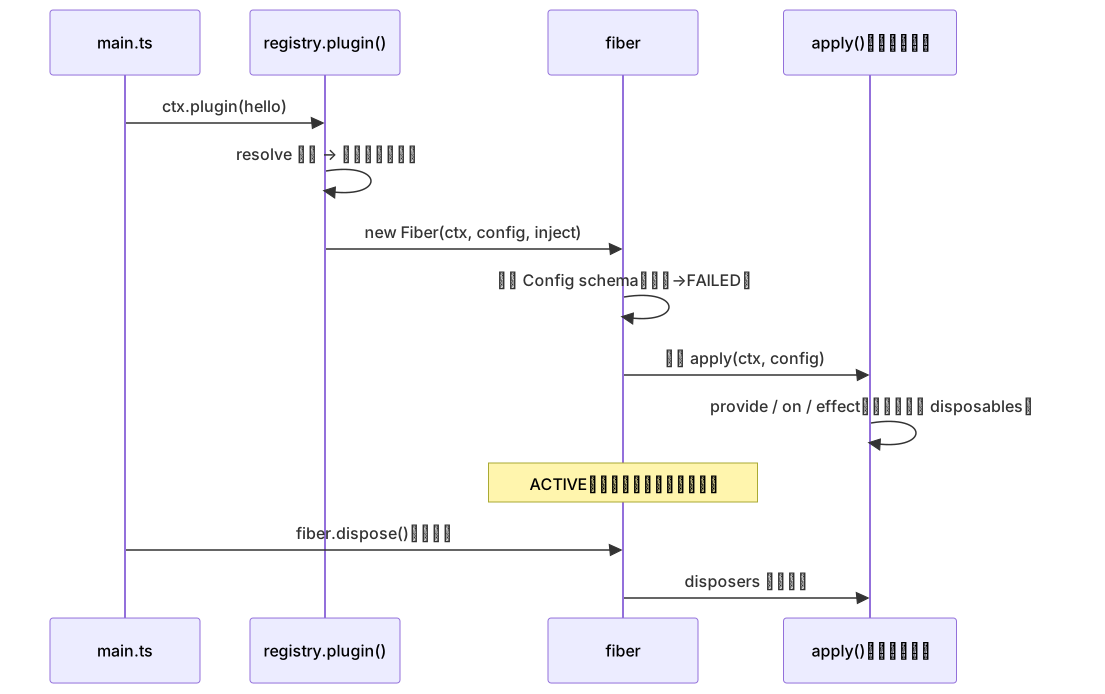
Config:带校验的插件配置
Config:带校验的插件配置
第三种形态的对象插件带 Config(Standard Schema——zod 等 schema 库都实现了它)。配置在插件启动前被校验,失败即 ValidationError(fiber.ts
resolveConfig):
import { z } from 'zod'

const Config = z.object({ greeting: z.string().default('你好') })
type Config = z.infer<typeof Config>

export default {
  name: 'greeter',
  Config,                                    // ← schema 挂在 Config 字段
  apply(ctx: Context, config: Config) {
    // config.greeting 有完整类型:string
  },
}
校验失败时 fiber 进入 FAILED 状态,错误信息逐条列出 schema issue——插件不会带病启动。
与 dsh 的对照
dsh 的插件全是这三种形态的实例:tool-fs 是函数插件(export const inject = [...]; export function apply);ToolRuntime 是类插件(super(ctx, 'tools'));loader 配置树里的每个条目最终都指向这三种形态之一(第 11 篇讲配置怎么变成插件)。
常见踩坑
- 插件名取自
apply——对象插件若只写{ apply }而无name,registry 会把 name 置空(registry.tsif (name === 'apply') name = undefined)——诊断日志里就叫无名插件; - Config 用了异步校验——
resolveConfig明确抛TypeError('Async config validation is not supported'); - 在 apply 里做异步初始化却没等完成——apply 返回 Promise 会被 fiber 等待,但注册服务是构造/同步阶段的动作,别把”就绪”误当成”已注册”。
随堂练习(带验收标准)
- 跑通最小例子,三个形态各写一遍并互相替换。验收:行为完全一致;
- 给 Config 加
level: z.number().min(1).max(3),传入level: 5启动。验收:看到 ValidationError 且逐条列出 issue; - 打开
vendor/cordis/src/registry.ts找到resolve(),解释为什么”同一个函数注册两次共享 runtime”。