system-prompt:提示词是怎么组装出来的
专栏:DeepSeek Harness · 第 8 / 14 篇上一篇的 pre-step 里有一步 systemPrompt.assemble(...),本篇就拆它。system prompt 在多数项目里是一段写死的长字符串,在 dsh 里它是注册表 + 确定性流水线——因为工具 schema、身份文案、策略句子来自几十个互不相识的插件,必须有一套机制把它们合成一份稳定、可缓存、可复现的文本。
四种注册
ctx.systemPrompt 服务接受四种贡献:
| 注册 | 内容 | 去向 |
|---|---|---|
section() | 提示词片段(静态文本或求值函数) | system 文本 |
context() | 动态运行时上下文(时间、工作区、策略句子) | 不进 system,作为带来源的 user 消息注入历史 |
tools(provider) | 工具 schema 提供方 | 请求的 tools wire 字段 |
variable(name, provider) | {{变量}} 求值器 | 渲染时插值 |
所有注册都支持全局层与 agent 作用域层(后者遮蔽同名全局项)。片段接口:
// packages/core/system-prompt/src/index.ts:52-74
export interface PromptSection {
  /** Unique name — a duplicate registration throws. */
  readonly name: string
  /** Sections are concatenated in ascending order. Equal orders use code-unit name order. */
  readonly order: number
  /** Static text or a provider evaluated at each assembly. The text may
   * reference `{{variable}}`s — interpolated later, by {@link renderPrompt}. */
  readonly text: string | ((context: AssembleContext) => string)
  /**
   * Treat this contribution as the complete system prompt. Assembly still
   * runs the cooperative waterfall …, then restores this exact section as
   * the sole prompt section. More than one effective complete section makes
   * assembly fail.
   */
  readonly complete?: boolean
}
集中分配的稀疏 order
顺序不是「谁先注册谁在前」(那会随插件加载顺序漂移),而是集中分配的具名稀疏 order——数字之间留出大量空隙,新插件可以插进任何缝隙而不动别人:
// packages/core/system-prompt/src/index.ts:121-152(节选)
const SECTION_ORDERS = {
  HARNESS_IDENTITY: -1000,   // "You are an AI agent powered by DeepSeek Harness."
  HARNESS_SOURCE: -900,
  DEPLOYMENT_PERSONA: 0,     // 部署 persona(可配置)
  PLAN_POLICY: 500,
  FILE_REFERENCE: 900,
  TOOL_BASH: 1000,
  TOOL_READ: 1100,
  TOOL_WRITE: 1200,
  TOOL_EDIT: 1300,
  TOOL_WEB_SEARCH: 2000,
  TOOL_LSP: 2200,
  TOOL_SUBAGENT: 2800,
  TOOLS_SDK: 5000,
  STRUCTURED_OUTPUT: 9900,
} as const
排序是确定性的:order 升序,同号按名称代码单元序——注册顺序不影响最终文本,这是前缀缓存可复用的前提之一。
组装流水线
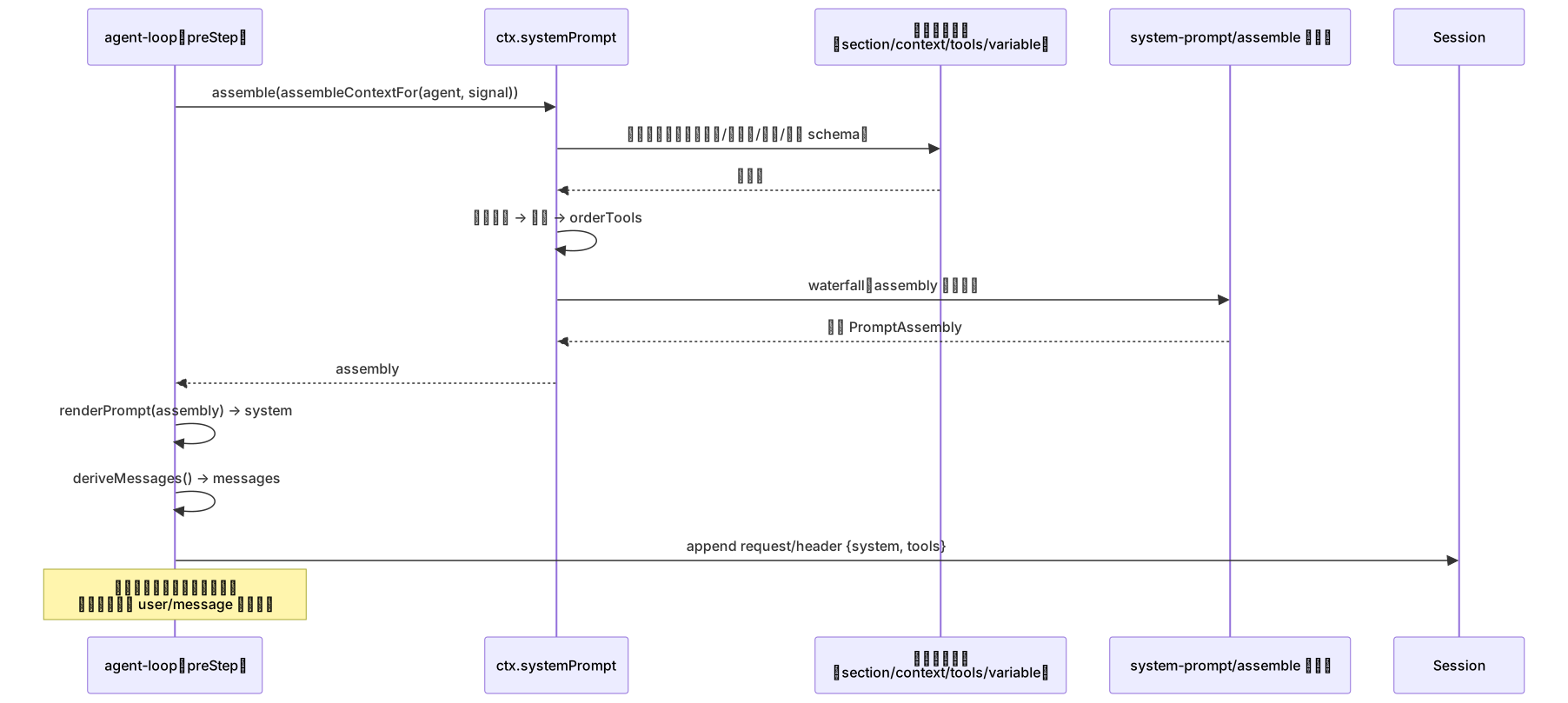
assemble() 的完整步骤:

waterfall 环节给了插件最后一道改写机会(比如 plan-mode 插件注入协作策略段)。流水线主体:
// packages/core/system-prompt/src/index.ts:573-611(节选)
const sectionDefinitions = [...sectionByName.values()].sort(comparePromptSections)
const completeSections = sectionDefinitions.filter(section => section.complete === true)
if (completeSections.length > 1) {
  throw new Error(`multiple complete prompt sections are active: ...`)
}
let completeSection: AssembledSection | undefined
const sections = sectionDefinitions.map((section) => {
  const assembled = {
    name: section.name,
    text: typeof section.text === 'function' ? section.text(context) : section.text,
  }
  if (section.complete === true) completeSection = { ...assembled }
  return assembled
})
const assembly: PromptAssembly = {
  sections,
  contexts: runtimeContextSuppressed ? [] : [...contextByName.values()]
    .sort((a, b) => a.order - b.order)
    .map(entry => ({
      name: entry.name,
      text: typeof entry.text === 'function' ? entry.text(context) : entry.text,
    })),
  tools: orderTools(collected, this.toolOrder, knownNames),
  variables,
}
const transformed = await this.ctx.waterfall(
  scopeTarget(this, scope), 'system-prompt/assemble', assembly, context,
  () => Promise.resolve(assembly),
)
关键设计:动态内容不进 system
如果每次请求都把「当前时间」「工作区文件列表」拼进 system 文本,前缀缓存就废了。dsh 的做法:动态上下文是独立的 context() 注册,组装成快照后,只有当快照发生变化时才作为一条带来源的 user/message 追加到历史末尾(source 标明来自哪个插件)。system 文本因此保持逐字节稳定。
配合第 6 篇的 request/header(记录渲染后的 system 与工具 schema),每次请求都能精确重建;前缀一致即 KV cache 可复用。dsh 甚至为策略句子准备了固定文案(如审批策略的 ask/never 各一句英文),追加在保留历史之后——一切为了前缀。
工具 schema:同一组装的另一半
「模型知道自己能用什么工具」与提示词是同一份组装结果的两个出口:assembly.sections → system 文本,assembly.tools → 请求的 tools 字段。每个 agent 看到的工具子集由工具提供方返回的 ToolProviderResult.schemas 决定,toolOrder 配置再统一排序(未列出的工具按字典序插到标记位)。toolOrder 形状错误在加载时报错、未知工具名在组装时报错——防止静默漂移。
一次 assemble 的时序
与其他模块的联系
- agent-loop(第 7 篇)是唯一的调用方:pre-step 每步 assemble 一次;
- tools(第 9 篇):
ToolRuntime构造时向 systemPrompt 注册工具 schema 提供方——工具与提示词是同一组装的两个出口; - session(第 6 篇):
request/header落日志记录渲染后的 system 与工具清单,前缀一致性可审计; - 缓存:片段确定性排序 + 动态上下文走消息尾部,是第 6 篇 KV cache 纪律的实现。
写你自己的插件时(第 14 篇),给模型「讲规则」的正确姿势就是注册一个 section;而每次都可能变的内容请注册 context——前者图稳定缓存,后者图新鲜。用错位置要么缓存失效,要么信息陈旧。
循环的两大输入(prompt、tools)已经就位。下一篇看第三个部件:工具调用的把关流水线。